Archive for the ‘safety’ Category
-
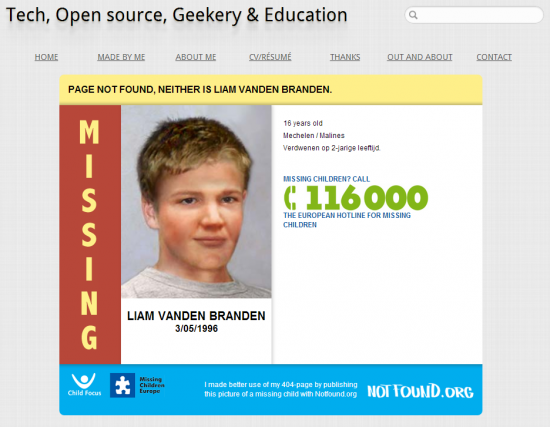
Use Your 404 Pages To Help Find Missing Children
If you visit a page on my blog that has gone missing it will now hopefully help (albeit just a touch) find missing children. Here is a screen shot of how it looks:
I’m going to ask Primary Technology to consider rolling this out across all of their sites! What do you think, would you be happy if your schools blog 404 pages helped to find missing children?
-
What style of illustrations do Primary School kids like?
We all know what a children’s illustration looks like right? Sort of in-between Dr Seuss and the Gruffalo, maybe with a bit of Spot thrown in. What I want to know is why in all of the test groups I have done over the last few weeks the most vector/cartoon style stuff is more popular with kids (both boys and girls) from the ages of 8 to the ages of 12?
Explain yourself
Spot is a good example of an illustrator moving their illustrations towards what we have found is a “preferred style of art” amongst Primary School age children.
What has changed?
The objects have become simplified and the “stroke” effect has been used with a greater thickness.
I can only assume that cartoon channels such as Nickelodeon & The Cartoon network have changed the style of art that the children I spoke to enjoyed. I know this is all very speculative and I am making some big assumptions but the evidence I have found whilst trying to find the correct illustrator for Safe Search has shown me that kids prefer vector based art as opposed to hand drawn objects..
How does this even matter?
Well it means that in the future we will try to keep our art more vector based, we will hire graphic designers/artists instead of illustrators. There is a place for illustration and I’m sure if they are done right they can look great however I can be confident in saying that Primary Technology will be sticking to the style we have used in the past as it seems to be a winning formula(despite the fact I tried to break it). Please don’t take this post as factual, it is not scientific. It is my opinion based on my experiences of a small(handful) of children in only a few schools.
Related articles
- Hiring Illustrators (mclear.co.uk)
-
Update: Youtube into the Primary Classroom
Just a quick youtube video explaining where we are at with getting youtube into the primary classroom
-
5 Fantastic Internet / E-Safety resources – #education
Safer Practice with Technology – http://www.kenttrustweb.org.uk/UserFiles/CW/File/Advisory_Service_ICT/E-Safety/SaferPracticeWithTechnology-260509.pdf – For adults working in schools, this document covers using technology as a communication tool in professional relationships, protecting adults from minteration of behvaiour and understanding personal and professional boundaries.
North Yorkshire County Council – E-safety Links and Resources – http://content.yudu.com/Library/A1dk37/esafetyApril09/resources/index.htm?referrerUrl=http://www.yudu.com/item/details/74728/e-safety–April-09-%3Frefid%3D18007 – This site is a selection of recommended sites to use to delivery E-Safety in schools.
Internet Safety @ Next Generation Learning – http://www.nextgenerationlearning.org.uk/At-Home/Internet-safety/ – Here you will find links to lots of resources on internet safety. The content is aimed at both home and school and has resources for parents and children.
E-safety week – http://www.esafetyweek.info/ – I love this idea. E-Safety can affect every aspect of our lives so to introduce it across an entire week seems fantastic. This site is made by Oldham and provides a framework for other LA’s to do similar exercises.
Primary School Safe Search – http://primaryschoolict.com/ – A google powered safe search engine that gets educational results more accurately. Great for setting as pupils and teachers home page. I like this site because it’s not so much a teaching resource as a learning aid.

-
Review of Microsoft Family Safety Installation
Today im reviewing Microsoft Family Safety with a consideration on e-Safety for parents“With Family Safety, you decide how your kids experience the Internet. You can limit searches, block or allow websites, decide who your kids can communicate with when they’re using Windows Live Messenger, Hotmail, or Spaces and monitor what websites they’re visiting…”
In this review I will be installing the package and looking at what this really means in real life.
The product is easily downloadable from http://download.live.com/familysafety
Once you have downloaded and run the package you get this installer screen:
I was shocked to see Photo Gallery, Toolbar, Writer, some outlook and some Live Add ins bundled. Also SQL Server CE 3.1 is required and some of my applications will be updated.For me this is bloatware already. I want an application that does what it sais in the blurb so I am going to remove all of the additional programs except from Family Safety (However you may want some of this functionality).With everything else removed the install is a quite large 109 MB. I hope this disk space usage is justified.I needed to close MSN messenger to proceed and the install process took 8 minutes to complete on a machine with with an Intel Core2 6600 & 2 GB ram.Once install is complete you are presented with this screen:I have already set my search provider to google safe search and my home page to Primary School Safe Search so I don’t want to do that. I also don’t want to help improve Windows Live, not right now.Now for a restart… Microsoft never seemed to learn that this is the most frustrating thing about most of their products for IT professionals however parents might not mind this restart as much.After the restart I was prompted to “Sign Up” to Windows live but I already have windows live so I clicked Close. Nothing has been placed on my desktop or start menu and Windows Live Messenger has not opened as it usualy does. Very bad first impression.I had to browse to Start – Windows Live – Family Safety, here I tried to sign in as a parent using my hotmail/live username/password. I was given an Error That I have not yet ereviews the Windows Live Terms of Use. No link was provided. I logged into my hotmail to look for the Live Terms of Use.. I clicked More then Family Safety and then clicked “I accept”.Then I clicked Sign in again, now im in. Already im convinced this is too complicated for parents.I am going to leave it here for today, it has been 30 minutes so far and the install is done but the configuration isn’t.In my opinion most parents would simply not go through this entire process as it is too complicated.Part 2 of this post will review configuration. Expect it in a few days.
Recent Videos
Recent Posts
- The conection to the server was unsuccessful
- Collaborative drawing with Etherdraw
- Blender for 3D Printing
- Improving Blender Renders with Photography Techniques
- Etherpad USA Meetup 2013 videos
- 2013 Etherpad SF Meetup part 1 of 10 – intro and etherpad-lite status from John McLear – YouTube
- Real time chat updates in Etherpad
- Pad Stats in Etherpad
- Temporarily Stop others writing on a pad
- Collaborative Markdown editing and export in Etherpad

![Spot-the-dog[1] Spot the dog1 300x200 What style of illustrations do Primary School kids like?](http://mclear.co.uk/files/2011/01/Spot-the-dog1-300x200.jpg)